- Do a 360 and find the farthest away wall.
- Drive toward it and hit it.
- Repeat steps 1 and 2 until one set of parallel walls are equally away from the robot.
- Execute the built-in DOCK method.
Tuesday, June 23, 2015
Gold Rush Plan
My plan for the Gold Rush!

Monday, June 22, 2015
RoboCamp Day 1 - Questions about the Survey Route Mission
Before we began on our code, we had several questions about some of the rules for the rover speed challenge.
During this challenge, you will be given bonus points if your robot autonomously returns to the start. Also, your points will be doubled if your robot doesn't hit the side walls.
- What part of your robot must cross the finish line for the time to stop? This is so our robot knows when to start turning around.
- If your robot is doing the "return bonus", does that count as part of its time? If our robot has to go twice the distance, it won't get a very good time. This will help us decide whether or not to do the return bonus.
- How far away from the back wall is the finish line? If we know how far away the finish is, we can know when the robot has crossed the line.
Friday, May 29, 2015
Mentor Post: Turning a Two Wheeled Robot
Our iRobot Create is based on two drive wheels. All movement of this robot can be understood in terms of the relative and absolute speed of these wheels. This post attempts to layout an intermediate method for turning a robot that allows turns to be computed with the robot in motion.
The geometry of a turn. We can define any turn as a combination of the angle of the turn and the radius of the turn. This is a step forward from last year’s pivots. A pivot being a turn with a zero turn radius.
The geometry of a turn. We can define any turn as a combination of the angle of the turn and the radius of the turn. This is a step forward from last year’s pivots. A pivot being a turn with a zero turn radius.
The advantage of this turn is that we can maintain speed rather than stop to make the turn. This allows the robot to move more smoothly.
With a two wheeled robot we need to determine what wheel speed is necessary to make this turn. It is important to realize that the turn can be made at any speed simply by controlling the individual speeds of the wheels. In this post we will only consider constant speed turns, these turns would result in circles instead of spirals. By limiting the turns we simplify the math. The question becomes how do we compute those speeds?
With a two wheeled robot we need to determine what wheel speed is necessary to make this turn. It is important to realize that the turn can be made at any speed simply by controlling the individual speeds of the wheels. In this post we will only consider constant speed turns, these turns would result in circles instead of spirals. By limiting the turns we simplify the math. The question becomes how do we compute those speeds?
If you look at the drawing above you will see that the left wheel has to travel a longer distance than the right wheel. In order to make this turn correctly the two wheels will need to travel these two distances at the same time. How can we compute the travel distance?
We can see from this drawing that the two wheels each travel an arc of a circle defined by different radii. If we let r be the radius of the turn and d is the distance from the center of the robot to the center of a wheel, a = r + d and b = r - d. Of course these values would be switched if we made a left turn. The actual distance is also a factor of the angle of the turn.
We will need to compute the arc of a circle. If you need a refresher check out Cool Math. The arc of a circle is the angle * radius. However that result uses radians. If you are keeping your angle in degrees then you will need to convert it.
Today’s task:
Right a method that computes the wheel speeds for a turn for a given radius. The method should rely on a call to int[] Robot.getCurrentWheelSpeed() and return left and right wheel speed below Robot.MAX_LEFT_WHEEL_SPEED and Robot.MAX_RIGHT_WHEEL_SPEED. Make certain the routine efficiently handles positive and negative angles.
Ending the Turn
How do we decide when our turn is complete? We can use a sensor that returns our orientation, we could use dead reckoning by computing a time based upon wheel speed or we could measure the actual distance travelled by each wheel. Ideally we would combine all these methods to reduce error.
Computing turn wheel speed is one of the fundamental building blocks for moving the robot in this year’s iARoC competition.
We will need to compute the arc of a circle. If you need a refresher check out Cool Math. The arc of a circle is the angle * radius. However that result uses radians. If you are keeping your angle in degrees then you will need to convert it.
Today’s task:
Right a method that computes the wheel speeds for a turn for a given radius. The method should rely on a call to int[] Robot.getCurrentWheelSpeed() and return left and right wheel speed below Robot.MAX_LEFT_WHEEL_SPEED and Robot.MAX_RIGHT_WHEEL_SPEED. Make certain the routine efficiently handles positive and negative angles.
Ending the Turn
How do we decide when our turn is complete? We can use a sensor that returns our orientation, we could use dead reckoning by computing a time based upon wheel speed or we could measure the actual distance travelled by each wheel. Ideally we would combine all these methods to reduce error.
Computing turn wheel speed is one of the fundamental building blocks for moving the robot in this year’s iARoC competition.
Mentor Post: User Interface
Last year Anthony did a great job of making a functional, if not pretty user interface. This year I am asking him to focus on producing a more informative interface and building it in a way that is understandable to the team and extensible.
The team would like to show a map on the phone display. To allow this to be build without requiring a functioning robot and full scale maze I am going to ask Anthony to port the maze simulator and build a UI for it in Android Studio.
I will encourage him to use MVC techniques to build the interface. This will allow him to apply the same interface to the robot code once it is ready. I am also asking him to at least review the material design techniques. I hope that if he follows some of the patterns he will find it easier to build the user interface and modify it as we move forward.
Maze Simulator Project
Getting Started with Material Design

The team would like to show a map on the phone display. To allow this to be build without requiring a functioning robot and full scale maze I am going to ask Anthony to port the maze simulator and build a UI for it in Android Studio.
I will encourage him to use MVC techniques to build the interface. This will allow him to apply the same interface to the robot code once it is ready. I am also asking him to at least review the material design techniques. I hope that if he follows some of the patterns he will find it easier to build the user interface and modify it as we move forward.
Maze Simulator Project
Getting Started with Material Design
Mentor Post:Back to Work
As we close out May and head into the competition month it's time to get back to work. The team was sidetracked by preparation for the AP exam. In addition there are more than a few blog posts that never really got completed and are sitting in draft stage. I will probably publish them today as-is but the content may be a bit out of date and not finished.
We still have work to do to get the physical robot ready. The lack of permanent placement of ultrasonic sensors and the phone are slowing us down a little. Today's lesson will have the goal of coming up with a project plan, defining the physical changes to the robot and starting work on the UI and some new robot functions.
With robot camp less than a month away it's time to really focus on the work at hand make progress on this year's entry.
We still have work to do to get the physical robot ready. The lack of permanent placement of ultrasonic sensors and the phone are slowing us down a little. Today's lesson will have the goal of coming up with a project plan, defining the physical changes to the robot and starting work on the UI and some new robot functions.
With robot camp less than a month away it's time to really focus on the work at hand make progress on this year's entry.
Thursday, April 23, 2015
The Wonderful World of Sensor Limitations
Let's be honest. Sensors are not perfect. I know, after chocolate, sensors are one of the most helpful things in a strategy, but in order to use them efficiently, you have to distinguish between the thing you want to sense and the things that are background noises. When the multiple difficulties stack up, the sensors can be rendered useless (no pun intended). So! What are the main sensor troubles, and how can we troubleshoot it?
SENSOR FLAWS:
File One: Analog to Dialog
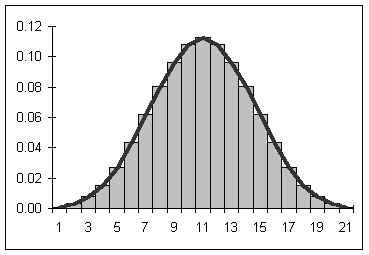
 The first of many different possible problems the numbers you are getting is that a sensor lacks the smoothness that an actual graph would have. See the left. While the beautiful, smooth, continuous, almost-fluid, even, unvarying bell curve you see on the left may be what you want (and yes, it had to have that many adjectives), instead, a sensor will give you only segments of data. As the distance between two reads increase, the accuracy of your readings decrease. Which is bad.
File Two: Noise
 Another annoying part of sensors is NOISE. If you don't know what I'm talking about, here's the short version: think about listening to music. Easy... until someone else nearby turns on their music. In other words, noise is the little things that are happening around the sensor that you aren't interested in. There are many algorithms that can fix this, but none are perfect. The key is knowing the accuracy of the sensor, lest you misread data as something fatally important when, in reality, it is noise.
 File Three: Bias
Finally, the last of the sensor difficulties: bias. This is basically when a sensor has a reading that is constantly off by the same amount. Every. Single. Time. The solution is simple: find the bias at the beginning of the program and get rid of it every single time. Although this may seem like a trivial bug, when combined with the above two, can make reading sensors much more than meets the eye.
File Two: Noise
File Three: BiasFinally, the last of the sensor difficulties: bias. This is basically when a sensor has a reading that is constantly off by the same amount. Every. Single. Time. The solution is simple: find the bias at the beginning of the program and get rid of it every single time. Although this may seem like a trivial bug, when combined with the above two, can make reading sensors much more than meets the eye.
Monday, April 20, 2015
Mentor Post: What I Learned Last Week
What should students be doing in a Java programming class? What should they be doing to get ready for an autonomous robotics competition? If you said programming or writing code you would be correct. There is always the need for some small amount of lecture, but I found myself at the end of class on Friday realizing that I had spent too much time talking and the students spent too much time working on the board rather than writing and running code.
Preparation is the key to having a good classroom experience and that preparation falls into two categories, environment preparation and lesson preparation. Environment preparation is typically a one time investment with recurring dividends. It involves ensuring that the computers, applications and repositories are available and ready to go. Lesson preparation needs to be done for each lesson and adjusted in real time.
At the school the students are using Apple computers for writing their code. Unfortunately we occasionally run into problems logging into these machines. This can eat valuable class time waiting for the system to become available. In addition to the machines, they need to be configured with the correct version of software for Java development. In our case that is Eclipse with the Android Development Tools correctly configured for our target platform. In addition the students need to have access to the correct repositories of code so they can quickly get to work. I will need to make some time outside of scheduled class times to attempt to resolve these issues so that class time can be more productive
With four students in the mix it's hard for them all to be working on the same tasks. My future lesson plans will be developed so that the students are broken into two pairs. One pair will focus on hardware specific programming and the other will work on simulator based programming. Teams will be changed frequently and everyone will have the opportunity to work in both domains, hopefully moving previous projects from the simulator to the robot and vice versa. In order to accomplish this goal I will need to have more specific tasks outlined for them. I will be attempting to develop these tasks much like the recipes that are used in the curriculum and posting them with repository links as they get created.
Finally, the only real way to improve is to review performance. I will be doing a better job of coming up with a lesson plan and making myself accountable for sticking to the schedule. This will help me identify what elements are working and what elements need more attention.
Preparation is the key to having a good classroom experience and that preparation falls into two categories, environment preparation and lesson preparation. Environment preparation is typically a one time investment with recurring dividends. It involves ensuring that the computers, applications and repositories are available and ready to go. Lesson preparation needs to be done for each lesson and adjusted in real time.
At the school the students are using Apple computers for writing their code. Unfortunately we occasionally run into problems logging into these machines. This can eat valuable class time waiting for the system to become available. In addition to the machines, they need to be configured with the correct version of software for Java development. In our case that is Eclipse with the Android Development Tools correctly configured for our target platform. In addition the students need to have access to the correct repositories of code so they can quickly get to work. I will need to make some time outside of scheduled class times to attempt to resolve these issues so that class time can be more productive
With four students in the mix it's hard for them all to be working on the same tasks. My future lesson plans will be developed so that the students are broken into two pairs. One pair will focus on hardware specific programming and the other will work on simulator based programming. Teams will be changed frequently and everyone will have the opportunity to work in both domains, hopefully moving previous projects from the simulator to the robot and vice versa. In order to accomplish this goal I will need to have more specific tasks outlined for them. I will be attempting to develop these tasks much like the recipes that are used in the curriculum and posting them with repository links as they get created.
Finally, the only real way to improve is to review performance. I will be doing a better job of coming up with a lesson plan and making myself accountable for sticking to the schedule. This will help me identify what elements are working and what elements need more attention.
Subscribe to:
Posts (Atom)